
DCN Voting
DCN Voting
The DCN system can be configured utilizing the Concentus or Standard DCN units for voting applications. All Concentus and standard DCN Delegate units feature 5 voting buttons. Units equipped with LCDs are capable of displaying voting results.
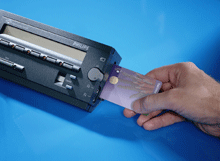
In conjunction with DCN Multi Voting or Parliamentary Voting and Video Display software under PC control voting can be setup with questions entered into a PC database with the results displayed in graphical format on a video screen. The Multi Voting module allows different types of voting formats to be entered such as multiple choice, opinion polling, ratings, and parliamentary whereas the Parliamentary Voting module is specifically for Parliamentary voting only. The controlling PC can save the results of votes and in conjunction with the Delegate Database software can save totals, group and individual results. Voing access can be supplied using chip cards if required allowing only specific individuals to cast votes.
The system can also work in stand alone mode with simple “Yes, No, Abstain” votes under control of a DCN Chairmans Mic with LCD display. The voting start and stops are controlled by the Chairmans mic and the voting results are tallied on the Chairman’s display.
Multi-Voting
This software module provides the user with the means to select and control six different kinds of conference voting, including Parliamentary Voting. In each case, the program allows the user to prepare for voting, specify vote-related parameters, display and print voting results and start and control voting. There are two main windows: the Preparation window and the Control window. The Preparation window is where voting motions are created and parameters are defined or changed. The Control window is used for starting and controlling voting. There is also a Results window for displaying voting results. These can be displayed in bar-, pie-or thermometer chart form. It is also possible to see voting results while the voting is still taking place. These ‘interim results’ can be specified in the Preparation window. It is also possible to enable a quorum function. This specifies how many authorized delegates must be present before a voting can legitimately take place. A majority function determines what percentage of votes constitutes a majority voting. The files created are called ‘script’ files as they act as the script for voting procedures. A file menu allows script files to be opened, created, saved, deleted and printed. There is also a facility for importing script files which have been created and saved in another application.
Features
- Allows selection between six different kinds of voting
- Extensive voting preparation facilities
- Wide range of vote-related parameter options
- Choice of three voting results display types
- On-screen help facility
To download a PDF datasheet on the Multi Voting Software module LBB 3576/00.
Parliamentary Voting Software
The Parliamentary Voting module is a DCN software module designed for controlling and monitoring conferences and discussions using the DCN contribution equipment. The module allows you to effectively implement and manage voting at a conference. The program covers a number of functions including vote preparation, specifying vote-related parameters, and starting and controlling voting. The module has two main windows; the Preparation window and the Control window. The preparatory and parameter definition work is mainly carried out from the Preparation window, and the starting and controlling of voting is carried out from the Control window.
Features:
- Allows complete operator control of parliamentary voting sessions
- Extensive motion preparation facilities
- Can output voting results to disk, hall displays or printers
- Wide range of vote-related parameter options
- On-screen help facility
To download a PDF datasheet on the Parliamentary Voting Software module
LBB 3575/00.
Video Display Software
Video Display is unlike all other DCN modules in that there is no user action required to operate it. It carries out its function – interfacing the DCN software with video displays – automatically. It provides a means of displaying conference-related information on video displays located in the conference venue. The information can consist of text, numbers and graphical elements like bar charts. All the information displayed is generated by other DCN modules, and it is not possible to alter this information in Video Display. To use Video Display, it is necessary to have a Video Display (VD) Client application. The VD Client application receives the information which is passed to it from the Video Display (server) module. The user can change settings related to how information is displayed on the video screens, such as text or background colors. This can be carried out either during or after installation of Video Display. The VD Client application is supplied with the DCN installation disks.
Features:
- Interface to monitors, video projectors and Vidiwalls
- Displays voting, message and microphone information
- Import facility for graphics such as logos and backgrounds
- Accepts information from other DCN software modules
To download a PDF datasheet on the Video Display Software module LBB 3584/00.
Delegate Database Software
The Delegate Database software allows users to compile a comprehensive database of information relating to participants at a conference or meeting. The delegate information is classed as either ‘conference-related’ or ‘personal’. Search facilities allow searches on different fields to facilitate quick input of database information.
Features
- Comprehensive database creation for all delegates
- Facility for configuring ‘screen line’ and ‘card label’
- Facility for printing labels and chip-card production
- Dedicated fields for ease-of-use
- On-screen help facility
To download a PDF datasheet on the Delegate Database Software module
LBB 3580/00.
Chip Card Authentication
The ID-Card Encoder software is used in combination with the Delegate Database software (LBB 3580) as a software driver for the production of ID-cards. These ID-Cards can be used to identify delegates during a conference and contain information specified using Delegate Database. An encoding unit (LBB 3577/00) is also required to produce the ID-cards.
To download a PDF datasheet on the Chip Card Software module LBB 3581/00.
Should you require further information about this item please contact us.
GET AN INSTANT QUOTE FOR OUR simultaneous interpretATION SERVICE NOW
ICS-SI
International Conference Systems (ICS) is the premier supplier of simultaneous interpretation (also referred to as conference interpretation or simultaneous translation) services and conference microphone services.
- hello@yourdomain.co